If you’re a developer, a small SaaS founder, or just someone who values control over their code, there comes a point where GitHub’s free tier starts to pinch. Maybe it’s the private repository limits, the slow clone speeds when you’re working from a cramped London flat, or the fact that your team’s IP is worth protecting behind your own firewall. Whatever the reason, running your own Git server on a UK VPS is not just a rite of passage — it’s genuinely practical. Here’s how to do it properly, without the fluff.
Why Roll Your Own Git Server?
Let’s be honest: most people don’t need this. GitHub, GitLab, Bitbucket — they’re fine. But if you’re hosting multiplayer game servers, running a real-time trading bot, or building internal tools for a UK-based team, latency matters. A UK VPS from a provider like Budget Ryzen 9950X VPS Hosting gives you sub-10ms ping to most of the UK, which means your git push and git pull commands complete in the time it takes you to blink. Also, you control access, backups, and the upgrade schedule — no surprise downtime or rate limits.
What You’ll Need
- A UK VPS (1 vCPU, 1GB RAM, 20GB NVMe is plenty for a small team)
- Ubuntu 22.04 or 24.04 LTS — we’ll use that here
- SSH access and a basic comfort with the terminal
- A domain or just the server’s IP (we’ll use both options)
Step 1: Update and Install Git
First, connect via SSH and update your package list:
sudo apt update && sudo apt upgrade -yThen install Git (it’s lightweight, so won’t eat into your resources):
sudo apt install git -yCheck the version — modern Git (2.25+) is fine. You’re not compiling a kernel here.
Step 2: Create a Git User
For security, never run Git repos under your own user account. Create a dedicated system user:
sudo adduser --system --group --shell /bin/bash gitThis creates a user called git with no password login — we’ll authenticate via SSH keys only.
Step 3: Set Up SSH Key Access
On your local machine, generate an SSH key pair if you don’t have one:
ssh-keygen -t ed25519 -C "your-email@example.com"Then copy the public key to the VPS. The old-school way works fine:
ssh-copy-id git@your-server-ipOr, if you prefer manual control, append the key to /home/git/.ssh/authorized_keys. Disable password authentication in /etc/ssh/sshd_config — set PasswordAuthentication no and restart SSH.
Step 4: Create a Bare Repository
Git repos on a server should be bare — no working files, just the version history. Choose a location, e.g., /srv/git:
sudo mkdir -p /srv/git
sudo chown git:git /srv/git
sudo -u git git init --bare /srv/git/my-project.git
That’s it — your repo exists. On your local machine, add it as a remote:
git remote add origin git@your-server-ip:/srv/git/my-project.git
git push -u origin main
If you push and get no errors, you’re already live. But let’s make this friendlier.
Step 5: Add a Git Web Interface (Optional, but Smart)
Not everyone on your team wants to type git log in a terminal. GitWeb is a minimal, zero-dependency web viewer that ships with Git itself:
sudo apt install apache2 -y
sudo git instaweb --httpd=apache2 --port=8080
Point your browser to http://your-server-ip:8080 — crude, but it works. For a proper web UI, you’d install Gitea or GitLab, but for a small team, GitWeb is enough. If you want something more polished, consider AMD & Intel Dedicated Server Hosting for the extra horsepower to run a full GitLab instance.
Step 6: Lock Down Access
Use gitolite if you need fine-grained permissions per repository. It’s a layer on top of Git that lets you control who can push to which branch. Install it from the official repo, then configure a gitolite.conf file. For most teams, this is overkill — just use SSH keys and an authorized_keys file per user.
Step 7: Automate Backups
Your code is your business. Use rsync or git bundle to back up the bare repos to another location, like an S3-compatible bucket or a second UK VPS. A simple cron job:
0 3 * * * rsync -avz /srv/git/ user@backup-server:/backup/git/Test it. You’ll thank yourself when a disk fails.
Real-World Scenario: A Small Game Dev Team
Say you’re three friends building a multiplayer game in Unity, with assets and scripts that change daily. GitHub’s 1GB repo limit is a pain, and you’re all in the UK. Hosting your Git server on a budget UK VPS with NVMe storage means clones are fast, pushes are instant, and you’re not fighting for bandwidth. The UK Budget VPS Hosting plans from us start at a few quid a month, with Ryzen 9950X processors that handle even the most I/O-heavy git operations (looking at you, large binary assets) without breaking a sweat.
Performance Notes
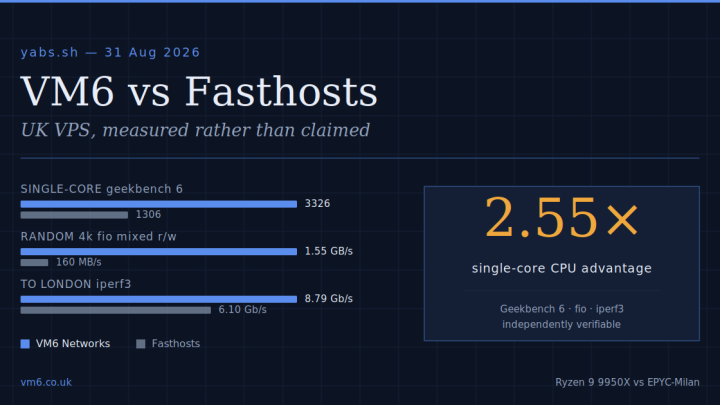
Single-thread performance matters for Git — operations like git gc and git repack are CPU-bound. The Ryzen 9950X in our VPS nodes delivers some of the highest single-core IPC in the market, so your git push won’t hang. Combine that with NVMe storage and you’ve got a Git server that feels local even when it’s in the same London data centre as you.
Conclusion
Setting up a Git server on a UK VPS isn’t rocket science — it’s a few commands, a lot of control, and zero monthly fees to a third party. You get low latency, full privacy, and the satisfaction of running your own infrastructure. If you’re ready to take the plunge, pick a UK VPS with decent specs, follow the steps above, and push your first commit. Your code, your rules.