So you’ve got a game server — maybe it’s a modded Minecraft realm for your mates, a Rust server for 60 players, or even a dedicated Squad or Arma 3 box. You’ve picked a VPS in the UK because you want that low ping. But here’s the thing: a VPS isn’t magic. If you don’t tweak it properly, you’re leaving performance on the table — and your players will feel it. Let’s fix that.
We’ve already covered why developers choose AMD Ryzen VPS for high-performance apps — the single-thread grunt matters for real-time games too. And if you haven’t secured your box yet, read our security hardening guide first. This article goes deeper into the actual optimisation tweaks.
Start with the Right Hardware (and OS)
Before you touch a config file, make sure your VPS isn’t a bottleneck. You want:
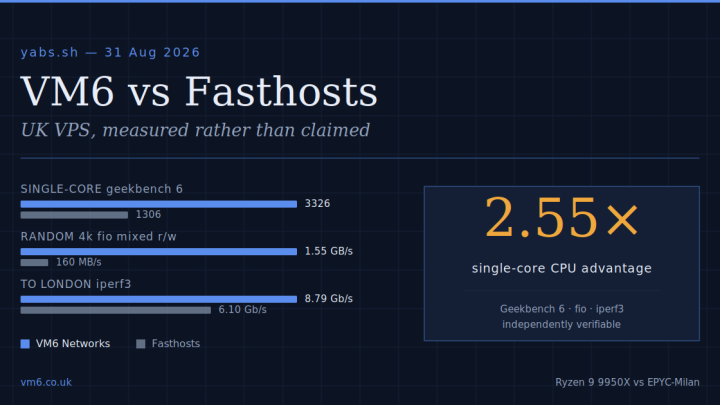
- High single-core clock speed — AMD Ryzen 9950X chips hit 5.7 GHz boost. That matters more than core count for most game servers (Minecraft, CS2, Factorio).
- NVMe storage — not SSD, not SATA. NVMe cuts chunk loading and world save times drastically.
- Low contention — a provider that doesn’t oversubscribe CPU or I/O. We don’t.
For the OS: use a minimal Linux distro. Ubuntu Server 24.04 LTS or Debian 12. No desktop, no GUI, no bloat. Install only what the game needs. Every unnecessary process chews CPU cycles and memory your players could use.
Tune the Kernel and Network Stack
Default Linux kernels are tuned for general-purpose workloads. For gaming, you want lower latency, not throughput at all costs.
Enable the BBR congestion control algorithm
BBR (Bottleneck Bandwidth and Round-trip propagation time) reduces latency under packet loss. Add this to /etc/sysctl.conf:
net.core.default_qdisc=fq
net.ipv4.tcp_congestion_control=bbr
Then run sysctl -p. It’s a five-second change that noticeably smooths out jitter.
Tweak buffer sizes
Too-large buffers increase latency. For a game server (small packets, low tolerance for delay), set these:
net.core.rmem_max = 212992
net.core.wmem_max = 212992
net.ipv4.tcp_rmem = 4096 87380 212992
net.ipv4.tcp_wmem = 4096 65536 212992
Disable mitigations for Spectre/Meltdown (if you trust your host)
On a single-tenant VPS or dedicated server, CPU vulnerability mitigations can cost 5–15% performance. Add mitigations=off to your kernel command line in GRUB. We do this on our Ryzen VPS plans by default — it’s safe when the hypervisor is locked down.
Game-Specific Tweaks
Every game has its own quirks. Here are two common ones.
Minecraft: Use Aikar’s Flags and a Paper fork
Don’t run vanilla Minecraft server JAR. Switch to Paper or Purpur. Then apply Aikar’s JVM flags — they optimise garbage collection and thread handling for low tick latency. Example:
java -Xms4G -Xmx4G -XX:+UseG1GC -XX:+ParallelRefProcEnabled -XX:MaxGCPauseMillis=200 -XX:+UnlockExperimentalVMOptions -XX:+DisableExplicitGC -XX:+AlwaysPreTouch -XX:G1NewSizePercent=30 -XX:G1MaxNewSizePercent=40 -XX:G1HeapRegionSize=8M -XX:G1ReservePercent=20 -XX:G1HeapWastePercent=5 -XX:G1MixedGCCountTarget=4 -XX:InitiatingHeapOccupancyPercent=15 -XX:G1MixedGCLiveThresholdPercent=90 -XX:G1RSetUpdatingPauseTimePercent=5 -XX:SurvivorRatio=32 -XX:+PerfDisableSharedMem -XX:MaxTenuringThreshold=1 -Dusing.aikars.flags=https://mcflags.emc.gs -Daikars.new.flags=true -jar paper.jar noguiTune the Xms/Xmx to your VPS RAM. For a 16GB VPS, use 12G for the server.
Rust/Valve games: Tickrate and rate settings
Set tickrate 64 or 128 depending on player count. For competitive shooters, 128 tick is ideal but costs more CPU. Then on the client side, players should set rate 128000, cl_cmdrate 128, cl_updaterate 128. Server-side, ensure sv_minrate and sv_maxrate match.
Monitor and Profile
Don’t guess. Use htop, iotop, and nethogs to see where your server struggles. If CPU is pinned on one core, you’ve hit the single-thread ceiling. That’s where our Ryzen 9950X chips shine — 5.7 GHz single-core boost is hard to beat. If disk I/O spikes during world saves, you need NVMe (we use only NVMe, no spinning rust).
For network latency, run mtr from your VPS to a UK player’s IP. You should see sub-10ms within London, sub-20ms across the UK. If you don’t, check your route and consider our UK-based network — we peer at LINX and LONAP.
Why Your Choice of Provider Matters
You can tweak all day, but if the host runs ancient CPUs, overloaded storage, or congested uplinks, you’re fighting physics. That’s where we come in. Our UK VPS and dedicated servers use AMD Ryzen 9950X processors, NVMe RAID storage, and a network built for low latency. We don’t oversubscribe — because we’d rather you stay than chase a few extra quid.
If you’re serious about gaming in the UK, start with the hardware that gives you a head start. Then apply the tweaks above. Your players will thank you — with lower ping and fewer complaints.
Already got a box with us? Check our Minecraft server guide for more specific settings.