Skip to content
Looking Glass Service Status
Client Login Register
VM6 Networks
  • Home
  • Web Hosting
    • cPanel HostingLiteSpeed · CloudLinux
    • UK Web HostingFast cPanel alternative
    • Reseller HostingWhite-label + WHMCS Module
  • VPS Hosting
    • UK VPS HostingRyzen 9 9950X · from £6/mo
    • UK Budget VPSIntel Xeon · from £1.75/mo
    • UK Managed VPSWe monitor · patch · respond
    • UK Forex VPSMT4 · MT5 · low latency
  • Dedicated Servers
  • Company
    • About VM6
    • Our Datacentres
    • Promotions
    • Affiliate Programme
    • Our Blog
    • Webdeck Panel

    • Knowledgebase
    • Service Status
    • Report Abuse
  • Contact Us
0 Deploy a VPS
  • Home
  • Store
    • Browse All
    • UK Web Hosting
    • UK VPS Hosting
    • Dedicated Servers
    • Cheap UK VPS Hosting
    • Register a New Domain
    • Transfer Domains to Us
  • Announcements
  • Knowledgebase
  • Network Status
  • Affiliates
  • Contact Us
  • More
  • Account
    • Login
    • Register
    • Forgot Password?
VM6 Networks
Home
cPanel Hosting UK Web Hosting Reseller Hosting
UK VPS Hosting UK Budget VPS UK Managed VPS UK Forex VPS
Dedicated Servers
About VM6 Our Datacentres Promotions Affiliate Programme Our Blog Webdeck Panel Knowledgebase Service Status Report Abuse
Contact Us
Deploy a VPS Client login
  1. Portal Home
  2. Knowledgebase
  3. Control Panels
  4. Plesk
  5. Domain Management
  6. How to Remove a Domain in Plesk

  Categories

Billing, Orders & Accounts
4
Control Panels
171
cPanel Web Hosting
186
Dedicated Servers
6
Mobile
11
VPS Hosting
18
WordPress
17

  Categories

  Tag Cloud

access account allows backups browser change Chnage configure connection connections console control dedicated Desktop disable display docker Fail2ban firewall fraud game Getting Guide hosting How How to html5 install Linux list lockout login Marked Methods MT5 OpenVPN Optimized Order package panel Payment Port portainer price pufferpanel putty Remote secure security server settings Setup SSH Started Template Ubuntu UFW uk vnc VPN vps windows WordPress your

  Support

My Support Tickets
Announcements
Knowledgebase
Downloads
Network Status
Open Ticket

How to Remove a Domain in Plesk Print

  • 0

You can remove a domain in Plesk by following this tutorial.

1. Log in to your Plesk account.

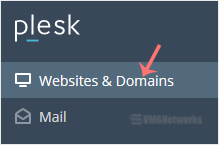
2. Click on Websites & Domains from the Sidebar Menu.
plesk-websites-and-domains-menu.gif

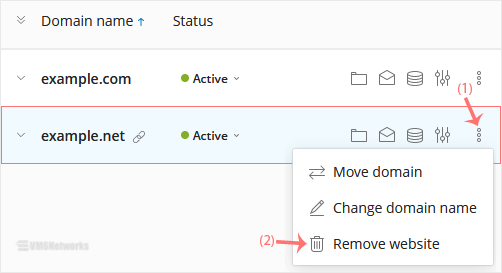
3. Under the list of domains, click on the More icon plesk-more-icon.gif in front of the domain and select Remove website.
plesk-remove-domain.gif

4. Confirm with Yes to remove the domain.

The domain has been successfully removed from Plesk.


Was this answer helpful?

Related Articles

How to Add a New Domain in Plesk Follow this tutorial to add a new domain to your Plesk account. 1. Log in to your Plesk... How to Add a Subdomain in Plesk In this tutorial, you will learn how to add a subdomain in Plesk. Subdomains help you create... How to Remove a Subdomain in Plesk A subdomain is an additional part of your primary domain. Please, follow this tutorial to remove... How to Redirect a Subdomain to an External URL in Plesk Learn how to set up a subdomain redirect in Plesk. This method works for pointing subdomains to... How to Remove a Subdomain Redirect in Plesk In this tutorial, you will learn how to remove a subdomain redirect in Plesk. This is useful when...
« Back

  Tag Cloud

access account allows backups browser change Chnage configure connection connections console control dedicated Desktop disable display docker Fail2ban firewall fraud game Getting Guide hosting How How to html5 install Linux list lockout login Marked Methods MT5 OpenVPN Optimized Order package panel Payment Port portainer price pufferpanel putty Remote secure security server settings Setup SSH Started Template Ubuntu UFW uk vnc VPN vps windows WordPress your

  Support

My Support Tickets
Announcements
Knowledgebase
Downloads
Network Status
Open Ticket
VM6 Networks

Independent UK hosting. AMD Ryzen 9 and EPYC nodes in UK datacentres, built and supported by the engineers who run them.

VM6 Networks Ltd · Company No. 16553775
Registered in England & Wales

Hosting
  • UK VPS Hosting
  • WordPress VPS
  • Game Server VPS
  • Dedicated Servers
  • UK Budget Hosting
Specialist
  • Docker VPS
  • VPN & Proxy VPS
  • Student Discount
  • UK Forex VPS
  • UK Managed VPS
Company
  • Our Blog
  • Promotions
  • Affiliate Programme
  • Service Status
  • Looking Glass
Support & Legal
  • Submit a Ticket
  • Knowledgebase
  • Legal & Policies
  • Terms of Service
  • Privacy Policy
© 2026 VM6 Networks Ltd. All rights reserved. UK datacentres · Coventry · Maidenhead · Norwich

Loading...
Loading...

Generate Password

Please enter a number between 8 and 64 for the password length