So you’ve just spun up a new UK VPS—maybe for your latest SaaS project, a private gaming server for the squad, or a low-latency Forex trading bot. It’s fast, responsive, and you’re itching to deploy. But here’s the thing: an unsecured VPS on a public IP is like leaving your front door unlocked in central London. Within hours, bots will be rattling the handle—scanning for open ports, weak passwords, and misconfigurations. We’ve covered the basics before in our Complete Linux VPS Security Guide, but this article digs deeper into the seven hardening steps that separate a hobby box from a production-ready server.
1. Ditch Password Authentication—Use SSH Keys Only
Passwords are the low-hanging fruit for brute-force attacks. Even a strong password can be sniffed or cracked over time. Instead, generate an SSH key pair on your local machine and copy the public key to your VPS. Then disable password authentication entirely in /etc/ssh/sshd_config by setting PasswordAuthentication no. This single step eliminates the most common attack vector. If you’re managing multiple VPSs, using an SSH agent makes key-based logins seamless without sacrificing security.
2. Change the Default SSH Port
Port 22 is the default for SSH, and it’s the first thing every bot screams at. Moving SSH to a non-standard port (say, 2222 or 54321) won’t stop a determined attacker, but it will reduce the noise in your logs by 99%. Update your firewall rules and SSH config accordingly, and don’t forget to restart the service. It’s a quick win that costs nothing.
3. Lock Down Your Firewall from Day One
A VPS without a firewall is like a server with a welcome mat. We’ve already walked through UFW installation and configuration, but here’s the critical point: start by denying all incoming traffic, then explicitly allow only what you need—SSH (on your custom port), HTTP/HTTPS (80/443) for web servers, and any application-specific ports. For example, if you’re running a Rust server for 60 players, that’s typically port 28015 UDP. Nothing else gets through. Set default policies to drop, not reject, to be less chatty about your closed ports.
4. Install and Configure Fail2Ban Properly
Fail2Ban is your bouncer. It watches logs for repeated failed login attempts and temporarily bans the offending IP. We’ve covered the basics in our Fail2Ban guide, but for hardening, customise the jails. Increase the bantime from the default 10 minutes to 24 hours (or even permanently for repeat offenders). Enable jails for SSH, Apache/Nginx, and any custom service. Then monitor /var/log/fail2ban.log to see how many attacks you’re blocking—it’s surprisingly satisfying.
5. Disable Root Login and Create a Sudo User
Logging in directly as root is a bad habit. Create a non-privileged user with sudo privileges, then disable root login via SSH (PermitRootLogin no). This way, even if an attacker guesses a username, they still need to escalate privileges—and you’ll have an audit trail of who did what. Use sudo -l to review your user’s permissions and keep them minimal.
6. Keep Software Updated—Automate It
Vulnerabilities in packages like OpenSSL, Nginx, or system libraries are discovered constantly. Set up automatic security updates with unattended-upgrades on Debian/Ubuntu or dnf-automatic on CentOS/RHEL. Schedule a reboot window if needed—some updates require it. For critical services like web servers, consider using a staging environment to test updates before pushing to production. But for a solo VPS, automating security patches is the pragmatic choice.
7. Harden Kernel Parameters and Disable Unused Services
This is where veteran sysadmins shine. Edit /etc/sysctl.conf to enable kernel-level protections: disable IP forwarding if you’re not routing, enable rp_filter for source address validation, and set net.ipv4.tcp_syncookies to 1 to mitigate SYN floods. Then audit what services are running with ss -tulpn. Do you really need cupsd or avahi-daemon on a headless VPS? No. Disable and remove them. Every open service is a potential entry point.
Why This Matters for Your UK VPS
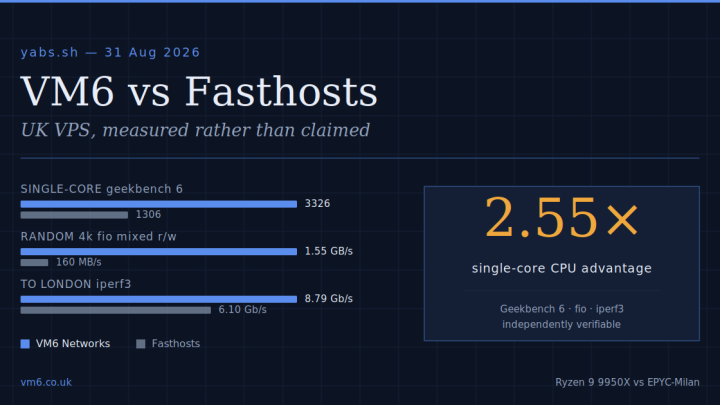
We see it all the time at VM6: a customer spins up a Budget Ryzen 9950X VPS, deploys their app in an hour, and forgets about security until they get a ‘suspicious activity’ alert from their provider. Our Ryzen 9950X processors deliver blistering single-thread performance—perfect for game servers, low-latency trading, or PHP-heavy sites—but raw CPU power means nothing if a bot compromises your box three hours after provisioning. Our UK-based infrastructure, combined with these seven steps, gives you a solid foundation.
Final Takeaway
Security isn’t a one-off checkbox; it’s an ongoing process. Start with SSH keys and a tight firewall, layer on Fail2Ban and automatic updates, and audit your services regularly. If you’re looking for a VPS that pairs high performance with UK-low latency, check our UK VPS hosting plans—they come with NVMe storage and full root access, so you can apply these exact steps from the moment your server is live. Now go lock that door.